
Writing has become an essential part of everyday life. Students prepare assignments, professionals write emails and reports, bloggers publish articles, and businesses create marketing content. While writing is important, producing clear, natural, and error-free content can sometimes be challenging. This is where QuillBot has become one of the most popular writing tools available today.
QuillBot is widely used by students, writers, marketers, researchers, and business professionals who want to improve their writing without spending hours editing every sentence. It offers several tools that help rewrite text, check grammar, summarize long articles, improve vocabulary, and create polished content.
In this guide, we’ll explore everything you need to know about QuillBot, including its features, benefits, pricing, advantages, limitations, and practical tips for using it effectively.
What Is QuillBot?
QuillBot is an online writing assistant designed to improve written content. It uses artificial intelligence to help users rewrite sentences, correct grammar mistakes, summarize documents, and make writing more natural and readable.
Unlike traditional grammar checkers, QuillBot focuses on improving sentence structure while maintaining the original meaning. This makes it useful for people who want their writing to sound clearer, smoother, and more professional.
Millions of users worldwide rely on QuillBot for academic work, business communication, blog writing, and everyday writing tasks.
Why QuillBot Has Become So Popular
The demand for writing tools has increased as more people work, study, and communicate online. QuillBot has gained popularity because it saves time while helping users produce better-quality content.
Many writers use QuillBot to remove repetitive wording, improve sentence flow, and create content that reads naturally. Instead of spending hours rewriting paragraphs manually, users can generate improved versions within seconds.
Another reason for its popularity is its easy-to-use interface. Even first-time users can quickly understand how the platform works without any technical knowledge.
Key Features of QuillBot
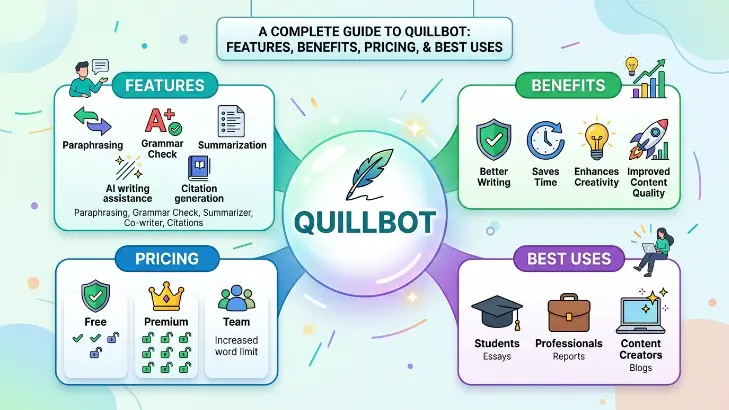
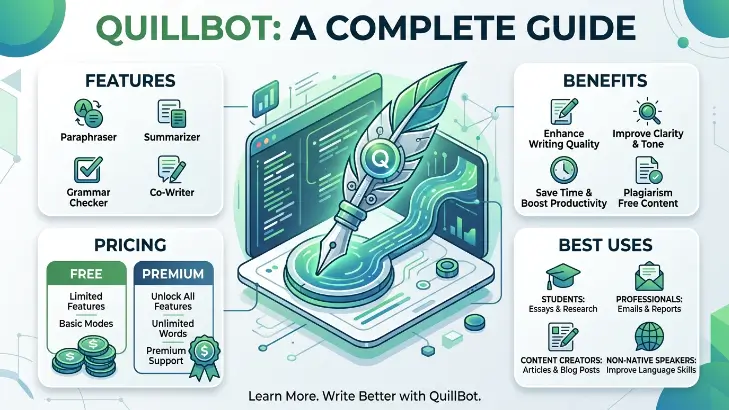
One of the biggest strengths of QuillBot is that it offers several writing tools in one place. Each tool is designed to solve a different writing problem.
Paraphrasing Tool
The paraphrasing tool is the most well-known feature of QuillBot. It rewrites sentences while keeping the original meaning intact.
Users can paste text into the editor, choose a writing mode, and receive an alternative version that sounds fresh and natural. This feature is especially useful for improving readability or avoiding repetitive wording.
Grammar Checker
Grammar mistakes can affect the quality of any piece of writing. QuillBot includes a grammar checker that identifies spelling errors, punctuation issues, and sentence structure problems.
It also suggests corrections that help improve overall readability without changing the intended message.
Summarizer
Reading lengthy documents can take a significant amount of time. The summarizer helps by turning long articles or reports into shorter versions that highlight the most important information.
This feature is useful for students, researchers, and professionals who need to understand key ideas quickly.
Citation Generator
Academic writing often requires proper citations. QuillBot provides a citation tool that helps users generate references in different formats, making research papers easier to prepare.
Translator
QuillBot also includes translation features that allow users to translate text between multiple languages while preserving meaning as accurately as possible.
Different Writing Modes
QuillBot offers several writing modes to match different situations. These modes change how the text is rewritten while keeping the original idea.
For example, some modes focus on making writing more formal, while others create simpler or more creative versions.
This flexibility allows users to choose the style that best fits their audience.
Who Uses QuillBot?
One reason QuillBot has become successful is its wide range of users.
Students
Students often use QuillBot to improve essays, assignments, reports, and research papers. It helps simplify complicated sentences and improves overall readability.
Bloggers
Content creators use QuillBot to polish blog posts, rewrite paragraphs, and remove repetitive wording before publishing.
Business Professionals
Professionals frequently rely on QuillBot when writing emails, presentations, proposals, and business reports. Clear communication is important in the workplace, and QuillBot helps create professional documents.
Researchers
Researchers use the summarizer and citation tools to save time while reviewing academic papers and organizing references.
Freelance Writers
Many freelance writers use QuillBot as part of their editing process. It helps improve sentence flow while reducing manual editing time.
Benefits of Using QuillBot
One of the biggest advantages of QuillBot is efficiency. Instead of rewriting every sentence manually, users can improve their writing much faster.
The platform also helps users learn better writing habits. By reviewing suggested changes, writers begin to understand how stronger sentence structures are created.
Another benefit is improved readability. Clear writing makes information easier to understand, whether the audience consists of students, customers, or business clients.
QuillBot also helps users expand their vocabulary by suggesting alternative words and phrases that fit naturally within the sentence.
Free vs Premium
QuillBot offers both free and premium plans.
The free version provides access to basic features, making it suitable for occasional users.
The premium version unlocks additional writing modes, longer text limits, faster processing, and advanced features designed for regular writers and professionals.
For people who write frequently, the premium plan often provides greater flexibility and convenience.
Tips for Getting Better Results
Although QuillBot is powerful, the best results come from using it wisely.
Always review rewritten content before publishing. Artificial intelligence can improve writing, but human editing ensures the final version matches your intended meaning.
Avoid rewriting entire documents without checking each paragraph. Small adjustments often produce better results than accepting every suggestion automatically.
You should also combine QuillBot with your own writing skills. Think of it as a writing assistant rather than a complete replacement for human creativity.
Common Mistakes to Avoid
Many new users expect QuillBot to create perfect content instantly. While the tool is highly effective, it still requires human review.
Another mistake is relying only on paraphrasing without understanding the original material. Writers should always make sure they fully understand the content they are editing.
Using too many rewrites can also make writing sound unnatural. Balance is important for maintaining a clear and consistent style.
Is QuillBot Safe?
QuillBot is generally considered a trusted writing platform used by millions of people worldwide. However, users should avoid uploading confidential or highly sensitive information to any online writing tool.
When working with important business or personal documents, always review privacy policies and follow good online security practices.
Alternatives to QuillBot
Although QuillBot is popular, several other writing tools are available.
Some users compare QuillBot with Grammarly, ProWritingAid, Hemingway Editor, LanguageTool, and other writing assistants. Each platform offers different features, so the best choice depends on individual writing needs and preferences.
Many writers even combine multiple tools to improve grammar, readability, and overall writing quality.
Frequently Asked Questions
Is QuillBot free to use?
Yes. QuillBot offers a free version with basic features, while premium plans unlock additional tools and higher usage limits.
Can QuillBot improve grammar?
Yes. It includes a grammar checker that helps identify spelling, punctuation, and grammar mistakes.
Is QuillBot useful for students?
Absolutely. Many students use QuillBot to improve essays, assignments, reports, and research papers.
Can professionals use QuillBot?
Yes. Business professionals frequently use it for emails, reports, presentations, and workplace communication.
Does QuillBot replace human writing?
No. QuillBot is designed to assist writers, not replace them. Human editing remains important for accuracy, creativity, and maintaining the intended tone.
Final Thoughts
QuillBot has become one of the most widely used writing assistants because it combines multiple helpful tools into a single platform. Whether you’re a student preparing assignments, a blogger publishing articles, a business professional writing reports, or a freelancer creating content for clients, QuillBot offers practical features that make writing easier and more efficient.
Its paraphrasing tool, grammar checker, summarizer, translator, and citation generator help users save time while improving the quality of their work. Although no writing tool is perfect, QuillBot provides valuable assistance for people who want clearer, more natural, and more polished writing.
The best way to use QuillBot is as a writing partner rather than a replacement for your own ideas. By combining its suggestions with careful editing and creativity, you can produce content that is accurate, engaging, and enjoyable to read.
 IQnewswire